
Shopping List - Listonic
Listonic - Smart Grocery ShoppingShopping
4.617.07K Reviews
- Version
- 9.19.2
- Installs
- 10.00M
- Age Rating
- Everyone
Screenshots





Our Review of Shopping List - Listonic
 Analysis by Appyee
My main takeaway from Shopping List - Listonic is that it works best when it turns a household’s scattered reminders into one shared, practical plan. I like it most for ordinary grocery trips, where the challenge is remembering what has run out and coordinating who will pick it up. It is more capable than a scrap of paper, but it still depends on people keeping the list tidy and current; it cannot decide what a household needs for them.
Who gets the most from a shared list
I’d recommend it first to people who shop with a partner, family member, or roommate. A shared list gives everyone one place to add missing staples instead of relying on a string of messages that can be overlooked. The useful habit is to add an item as soon as you notice it is running low, rather than waiting until the next person is already in the store. That small change makes the app more valuable than any single feature.
It can also suit someone who plans several errands at once. Separate lists let me keep a grocery run apart from a list for a planned meal or larger gathering, so an unusual ingredient does not get mixed into the everyday shop. I would name lists by purpose and retire them when that purpose is over; too many old lists can make choosing the right one needlessly confusing.
How it fits a real shopping routine
Imagine I notice that milk is nearly gone while making breakfast, while someone else realizes after work that we need vegetables for dinner. Both can add their items before the next shop, and the person heading to the supermarket can check them off as they go. If plans change, the list can be adjusted without reconstructing the whole conversation from memory. That is where Listonic feels genuinely useful: it keeps small decisions visible at the point when they matter.
For a more deliberate trip, I’d prepare the list at home rather than build it aisle by aisle. I can group items mentally or use separate lists for different occasions, then check the entries while shopping. Adding prices can help me keep an eye on expected spending, but I would treat those figures as my own planning notes, not a guaranteed final total: quantities, substitutions, and changing shelf prices can all affect what I pay.
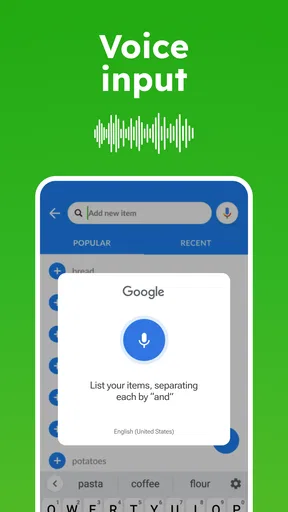
Voice input is handy when I am busy doing something else, but I would still glance over the result before relying on it. Names of products and quantities are easy to mis-speak or misunderstand, particularly when a specific variety matters. A quick review at home is a better trade-off than discovering in the shop that a broad entry such as “cheese” does not say what the recipe needs.
Using Listonic for less chaotic grocery trips
I find the best way to judge a grocery-list app is to ask whether it makes the next shop easier without creating another chore at home. This section looks at how Listonic can keep a shared trip on track, then turns to the practical choices—like naming lists clearly and deciding how much detail each item needs—that make that routine work.
Where it differs from paper and general notes
A paper list is wonderfully simple and needs no setup, but it is easy to leave behind and awkward to share. A general notes app can work for a solo shopper, especially if it is already part of their routine, yet grocery entries may end up mixed with unrelated reminders. Listonic’s shopping-focused approach gives the list a clearer job: collect items, make them easy to scan, and let more than one person contribute.
That focus is not automatically an advantage for everyone. If I only buy a few things occasionally, a note on my phone may be quicker than maintaining another app. And if my shopping depends on detailed meal plans, pantry quantities, nutrition goals, or price comparisons across stores, a dedicated planning tool may fit better. I see Listonic as a practical list manager, not a substitute for a full meal-planning or budgeting system.
Small habits that make it work better
One useful approach is to add items in the language the household actually uses, then agree on how much detail is enough. “Apples” may be fine for a flexible shop; a particular type or quantity matters when the item is for a recipe. Clear entries reduce the need to message each other from the aisle. For shared use, it also helps to settle on one active list for the next grocery trip instead of letting everyone add things to whichever list they last opened.
Past-purchase suggestions can speed up repeating shops, but I would treat them as prompts rather than a ready-made weekly order. A product bought once for a special meal may not belong on the next list, while a frequently used staple can still be forgotten if nobody notices it is low. Reviewing suggested items before adding them keeps convenience from turning into unnecessary buying.
Offline access matters in a supermarket with a weak connection: I can still refer to the list when reception drops. For a household relying on shared changes, though, I would make sure everyone has opened the relevant list and that their edits are available before heading out. The offline benefit is strongest as a backup for viewing and continuing a shop, not as a reason to assume every device will instantly reflect every change without connectivity.
Limits worth weighing before you install
Sharing only helps when everyone uses it consistently. If one person keeps sending requests by text and another updates the app, the list can become incomplete in two places. Likewise, multiple lists are helpful only when their names make their purpose obvious. Neither issue is unique to Listonic, but they are practical friction points: the app can organize a household’s choices, not enforce a shared routine.
Customization and price notes add flexibility, yet they can also invite extra upkeep. I would avoid entering a price for every item unless tracking the estimate actually helps me make decisions. The best list is usually the one people can maintain quickly, not the most detailed one. If I wanted strict spending records, receipt tracking, or automatic stock management, I would look for a tool built around those jobs instead.
Listonic is free to start, with optional in-app purchases, so a casual shopper can try its core approach without treating it as a major commitment. It is rated for Everyone, and the app is developed by Listonic - Smart Grocery Shopping. Its 4.7 average from around 310,000 ratings and over 10 million installs suggest it has reached a broad audience, though popularity alone does not tell me whether its shared-list workflow suits a particular household.
What to expect from the app
The app belongs to the shopping category and has been available since April 20, 2010. Version 9.7.6 supports devices running Android 7.0 or later. Those details make it a long-established option rather than a newly introduced list concept, but the most important question for me is still everyday fit: do I want a dedicated place for grocery items, and will the people I shop with actually use it?
I would choose it over paper when I regularly forget lists or need another person to contribute, and over a general notes app when I want shopping tasks kept separate from everything else. I would skip it if my lists are tiny and infrequent, or if my real need is detailed meal planning and financial tracking. That distinction keeps expectations sensible: Listonic can make a shopping routine more coordinated without making the decisions behind it for me.
First Impressions
When I first downloaded Shopping List - Listonic, I was impressed by its clean and intuitive interface. It’s like they knew exactly what I needed, designing an app with simplicity and functionality in mind. Getting started was a breeze, and I didn’t have to waste time figuring out where things were or how they worked. It's like having a personal assistant who gets the job done without unnecessary chatter.
Features That Make Life Easier
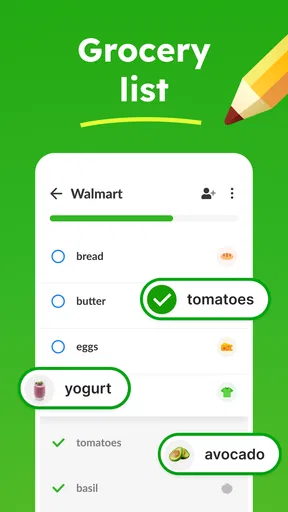
One of the standout features is the ability to create multiple shopping lists. Whether you’re organizing a big dinner party or just planning your weekly groceries, Listonic has got you covered. You can name each list, which is super handy for keeping things organized.
Another feature I absolutely love is the ability to share lists with family or roommates. Gone are the days of sending endless texts about who needs what. Just share the list, and everyone can add or check off items as they go. It saves time and, quite frankly, a lot of headaches.
Smart Suggestions
Listonic has this nifty feature where it suggests items based on your previous purchases. It’s like the app is getting to know your shopping habits, which is both cool and a little bit eerie. But hey, I’m all for anything that speeds up the shopping process. Plus, it helps reduce those impulse buys that seem to sneak into the cart.
Offline Functionality
One of the things I often worry about with apps is their reliance on internet connectivity. Thankfully, Listonic works offline, so even if you find yourself in one of those supermarket dead zones, your list is still accessible. It’s a small feature, but it makes a big difference.
Voice Input
Adding items to your list is as easy as saying them out loud. Listonic supports voice input, which is perfect for those moments when your hands are full or you’re on the go. I’ve found myself using this feature more than I thought I would, and it’s incredibly accurate.
Customization Galore
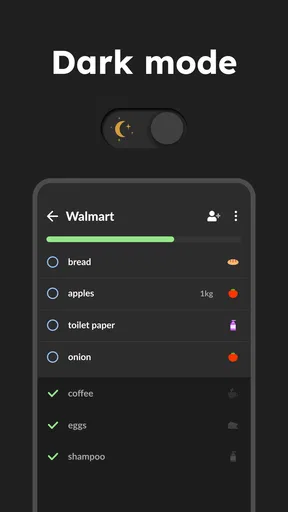
You can customize Listonic to fit your personal style and needs. Change the theme, prioritize items, and even add prices to keep track of your spending. The app feels like a little reflection of my own preferences, which makes using it a more enjoyable experience.
User Experience
Overall, the user experience is smooth and seamless. The app is fast, with no noticeable lag even when adding a large number of items. Navigating through the app is intuitive, and the icons are clear and well-designed. It’s evident that a lot of thought went into creating an app that doesn’t just work well, but feels good to use.
One thing I appreciated was the lack of intrusive ads. While there are some, they’re not overwhelming, which is a huge plus in my book. Nothing is worse than a pop-up ad when you’re in the middle of ticking off your grocery list.
Final Thoughts
If you’re looking for a reliable, user-friendly shopping list app, Shopping List - Listonic is definitely worth a try. It’s packed with features that make shopping easier and more organized, and the ability to share lists is a game-changer. Whether you’re a seasoned shopper or someone who just wants to streamline their grocery trips, Listonic offers a little something for everyone.
In a world where time is precious, this app saves you those few extra minutes that could be spent on something more enjoyable than wandering the aisles. So, give it a download, and happy shopping!
Verdict
Strengths of Shopping List - Listonic
- User-friendly interface enhances usability.
- Syncs across devices for seamless access.
- Voice input speeds up list creation.
- Smart suggestions improve shopping efficiency.
- Offline mode available for convenience.
Limitations of Shopping List - Listonic
- Limited customization options for lists.
- Ads can be intrusive without premium.
- Occasional sync delays between devices.
- No integration with some popular grocery apps.
- Lacks advanced budget tracking features.
Similar Picks in This Category
View All
SHEIN-Shopping Online
Roadget Business PTE. LTD.4.8

Amazon Shopping
Amazon Mobile LLC4.4


Mercado Libre: Compras online
Mercado Libre4.8

Wish: Shop and Save
Wish US Holdings LLC4.7

Alibaba.com - B2B marketplace
Alibaba Mobile4.4
You May Also Like
View All


Frequently Asked Questions
What features does Shopping List - Listonic offer?
Shopping List - Listonic provides a user-friendly interface for creating and managing shopping lists. Key features include real-time sync across devices, voice input for hands-free list creation, and the ability to categorize items. Users can also share lists with family members or roommates, making it easy to coordinate shopping tasks.
Is Shopping List - Listonic free to use?
Yes, Shopping List - Listonic offers a free version with basic features that are sufficient for most users. However, there is also a premium version available that provides additional features such as ad removal and advanced customization options, which can enhance the user experience.
How does Shopping List - Listonic handle data privacy?
Shopping List - Listonic takes user privacy seriously. It ensures that all personal data and shopping information are securely stored and not shared with third parties without consent. Users can review the app’s privacy policy to understand what data is collected and how it is used.
Can I use Shopping List - Listonic offline?
Yes, you can use Shopping List - Listonic without an internet connection. The app allows you to create and edit lists offline, and it will automatically sync any changes once you’re back online. This feature is particularly useful for shopping in areas with poor network coverage.
Is Shopping List - Listonic available on both Android and iOS?
Absolutely. Shopping List - Listonic is available for download on both Android and iOS devices. This cross-platform availability ensures that you can access and manage your shopping lists regardless of the device you are using, offering flexibility and convenience.
